The Honeywell Pro Series thermostat is one of the top branded products preferred by contemporary homes and workplaces. With more homeowners relying on the Internet of Things (IoT) to run their appliances, a thermostat is an indispensable component.
You should go with a reliable brand that has a wide range of devices suitable for every household. Before selecting a particular product, you’ll read up on the features, pros, and cons before finalizing your choice. You can safely rely on the Honeywell Home Pro Series because of its high-grade quality and innovative product range.

The Honeywell Pro Series Thermostat – An Overview
The Honeywell Pro Series thermostat has several features that make it a great buy. For starters, you’ll love the look and appeal of the wall-mounted gadget that blends into every modernistic home decor. The size and appearance of the touch screen are perfect for displaying the different settings with a user-friendly interface.
Understanding how to change the settings using the smart touch screen or button-operated interface is easily done. Of course, its integration with your smartphone app is a critical feature allowing you to manage the thermostat remotely.
The Honeywell Home Pro Series may be pricier than other comparable brands in the market today. However, its 5-year warranty makes it a great buy and well worth the extra dollars you spend on it.
How Honeywell Thermostats Work?
The best way to learn how Honeywell thermostats work is to rely on the accompanying Honeywell Pro Series thermostat manual. This manual gives you complete step-by-step instructions on how to work your thermostat. Watching Youtube videos is a great option, and you can also check the official Honeywell website.
If you get stuck, read the Troubleshooting section for answers. Using the phone app to manage the Honeywell Home Pro Series thermostat settings is very handy. So, the first step is downloading and installing the application to your phone, tablet, or mobile device.
Before purchasing the gadget, you’ll also want to check the phone app’s compatibility with various handsets. Also, check for the home automation systems you can use with the thermostat.
Remember that the Honeywell Pro Series thermostat comes with factory settings, so you’ll have to customize them. Once you’ve installed the device, check the preset temperatures, fan settings, and schedules for day times and night times.
Next, examine the display screen and identify the different buttons. As you configure the settings, the numbers will register on the screen. It will also show you the scheduled changes throughout the day as it happens in real-time.
Unless you’ve wired the device to the home power system, get into the habit of checking for low-battery alerts. Keep in mind that smart thermostats only work efficiently with a constant power supply.
Aside from controlling the Honeywell Pro Series thermostat manually or with phone apps, you can integrate it with voice control. Simply connect the thermostat to your home automation system.
Also Read
Thermostat Wire Color Code Guide
| Honeywell Pro Series Thermostat | Size | Touchscreen Interface | Warranty | Buy Now |
|---|---|---|---|---|
| Honeywell TH6220WF2006/U Lyric T6 Pro Wi-Fi Programmable Thermostat | 5 x 2.3 x 6 inches | Yes | 5 years | Check On Amazon |
| Honeywell Home Honeywell THX321WFS2001W T10 Pro Smart Thermostat | 6.2 x 5.8 x 3.1 inches | Yes | 5 years | Check On Amazon |
| Honeywell TH4210U2002 T4 Pro Thermostat | 6.3 x 5.2 x 2.4 inches | Yes | 5 years | Check On Amazon |
| Honeywell T9 Smart Thermostat with Sensors | 3.7 x 4.92 x 0.94 inches | Yes | 2 years | Check On Amazon |
| Honeywell TH2210DV1006 PRO 2000 Vertical programmable thermostat | 6 x 4 x 2 inches | No | 2 years | Check On Amazon |
1. Honeywell TH6220WF2006/U Lyric T6 Pro Wi-Fi Programmable Thermostat
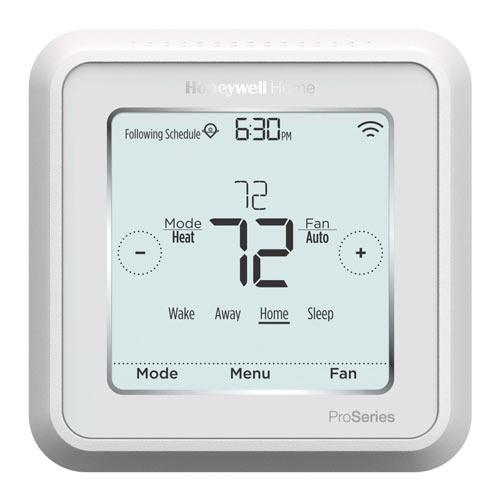
- Stores configured temperature settings and starts up when power is restored after an outage.
- Works well with an oil furnace heat pump as long as your home has an internet connection.
- After recent software upgrades, this Honeywell Pro Series thermostat is now compatible with Google Home.
- Has apps that work on Samsung Android phones also.
- The Honeywell phone app alerts users to a loss of connection with their home thermostat.
- Users can program the thermostat for different settings for all seven days of the week.
- Allows you to control your home’s heating and air conditioning systems but does not indicate humidity levels.
- In case of a power outage, the clock stops and has to be reset.
- Does not integrate a camera or microphone.
Buy Philips Hue Bulb on Amazon
Features of T6 Pro
- White in color and operated via a Wi-Fi connection
- Dimensions are 5” in length, 2.3” in width, and 6” in height
- Compatible with Amazon’s Alexa and Apple HomeKit
- Touchscreen interface
- Enables users to control a maximum of 2 heat stages and 1 cool heat pump or 2 heat stages and 2 cool pumps
- Comes with a 5-year warranty
- ENERGY STAR® certified
- Enables geofencing to conserve energy when homeowners are away
- Learns your preferred settings with extended use to ensure complete home comfort
2. Honeywell Home Honeywell THX321WFS2001W T10 Pro Smart Thermostat
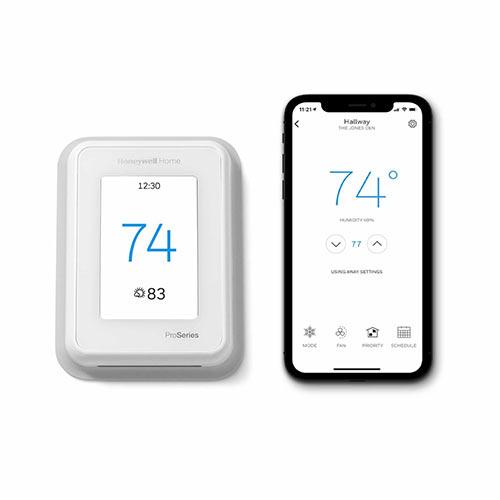
- Allows you to control the brightness of the display screen. The Preferences/Display function has options for Inactive Backlight and Inactive Sleep Backlight for nighttime use.
- Displays outdoor temperatures with a sensor or picks up information through the phone.
- Cannot be powered with baseboard heating systems
- Since the device comes with only one sensor, users may have to move it around. That’s the only way to control the temperatures in other rooms.

Buy Honeywell Pro T10
- White in color with dimensions like 6.2” in length, 5.8” in width, and 3.1” in height
- This honeywell home thermostat pro series is compatible with Amazon’s Alexa
- Battery operated, requires 2 AA cells, but can also be connected to a power source with the batteries for backup
- Works to achieve de-humidification with your cooling system
- RedLink 2.0 communication capability
- Comes with a touch-screen interface
- 5-year warranty
- U terminals designating the relay for your humidifier, dehumidifier, and ventilator
- Includes a built-in sensor and has an extra remote wireless sensor
3. Honeywell TH4210U2002 T4 Pro Thermostat
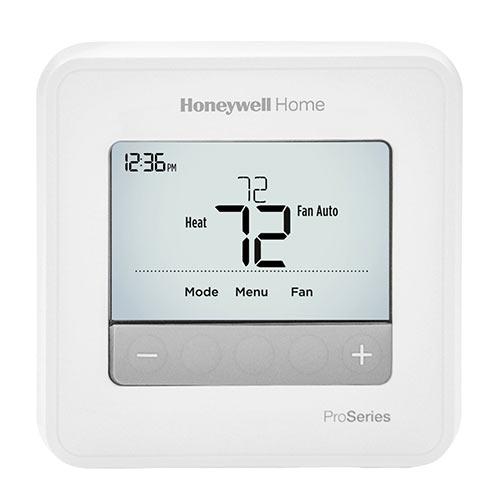
- Enables configuring the temperatures to change automatically all through the day
- Detailed instruction manual enabling DIY installation easily
- Large screen with clearly legible numbers and settings
- Has push-button controls for easy configuration
- Enables unique settings for all seven days of the week
- The device will only display temperatures, but not humidity levels in the room; for that, you’ll install a humidistat.
- This thermostat is not designed to manage humidity levels, but only controls the ambient temperature of your spaces.
- Not compatible with a mobile phone app or home automation system.
- Not W-Fi-enabled
Buy Honeywell T4 pro
Features of the Honeywell T4 pro
- Enables users to control up to 2 heat stages and 1 cool with a heat pump. Or 1 heat stage and 1 cool pump with conventional gas or LP
- Dimensions include 6.3” in length, 5.2” in width, and 2.4” in height
- Easy navigability because of the touch screen interface
- Manually activated only
- Comes with a 5-year warranty
- Requires 2 AA batteries
- Provides low-battery and filter change alerts
- Comes with a range of different modes like turning on and off, heating, cooling, emergency heating, and fan settings
- This Honeywell Pro Series thermostat learns the time interval needed by the appliances to achieve the desired settings. Thus, it activates the systems in advance to ensure uninterrupted ambient temperatures.
4. Honeywell T9 Smart Thermostat with Sensors
- Thermostat sensors also detect humidity levels
- Installing the Honeywell thermostat and linking with your utility company can earn you rebates for energy conservation.
- Effortless installation. You only need to feel the wires into the numbered slots and the T9 self-configures.
- Does not need a Wi-Fi connection to operate the sensors.
- Requires a common or C wire to work. Users may have to install a wire if their wiring systems do not have it. This thermostat also comes with a c-wire adapter which you have to buy.
- Offers only a 2-year warranty, while various other Honeywell Pro Series thermostat models come with a 5-year warranty.
- The main thermostat does not have in-built sensors. You’ll have to install a sensor next to the unit to sense the room temperature and humidity levels.
Buy Honeywell T9
Features of the Honeywell T9
- Enables users to control up to 2 heat stages and 1 cool with a heat pump. Or 1 heat stage and 1 cool pump with conventional gas or LP
- Dimensions include 6.3” in length, 5.2” in width, and 2.4” in height
- Easy navigability because of the touch screen interface
- Manually activated only
- Comes with a 5-year warranty
- Requires 2 AA batteries
- Provides low-battery and filter change alerts
- Comes with a range of different modes like turning on and off, heating, cooling, emergency heating, and fan settings
- This Honeywell Pro Series thermostat learns the time interval needed by the appliances to achieve the desired settings. Thus, it activates the systems in advance to ensure uninterrupted ambient temperatures.
5. Honeywell TH2210DV1006 PRO 2000 Vertical programmable thermostat

- Energy-saving device since it runs the burner for only a short time and then powers up the fan. This strategy raises the ambient temperature gradually and saves on fuel.
- Enables users to set their temperatures for the weekdays and weekends separately.
- This Honeywell Pro Series thermostat is not for users looking to integrate their thermostats with their smart home automation systems.
- Does not have mobile phone control capability
Buy Honeywell Pro 2000
Features of the Honeywell Pro 2000
- White in color with dimensions like 6” in length, 4” in width, and 2” in height
- 2 stages heat pumps and 1 cooling pump
- Backlit with an easy-to-read screen
- Works only on batteries (to be purchased separately)
- Suitable for homes and commercial spaces with a single electrical heating element.
- Basic no-frills thermostat featuring a real-time clock and push-button controls for managing your home temperature.
Buying Guide to Choose the Best Honeywell Home Pro Series Thermostat
If you’re in the market for good thermostat brands with reliability and good features, consider the Honeywell Home Pro Series. The Pro range is extensive with a selection of models with various features, pricing, and functionalities. You can pick the one that best matches your requirements.
Energy-Saving Models
Homeowners needing just a basic energy-saving model can go with the Honeywell Pro 2000.
Motion Sensors and Multiple Climate Zones
If you need a super-advanced model with motion sensors and the ability to create multiple climate zones across the house, you would go with the Honeywell T9 Smart Thermostat with Sensors.
Warranty
Users looking for complete assurance and accountability, might want to choose from the honeywell home pro series thermostat range. But pay careful attention to the warranty periods. Some products have a two or three-year warranty, while others have a 5-year warranty.
Remote Activation with Phone Apps
If you travel a lot or want to get a thermostat for a second vacation home, you’ll need a specialized device. Your choice of a thermostat would need remote activation and management and sensors to detect human presence.
Battery-Operated or C Wired
Always keep in mind that for any thermostat to work efficiently, it needs a consistent power supply. The best way to ensure that is to have a common C wire installed, linking directly to your HVAC systems. If you don’t have one, you might have to run a separate cable or go with a battery-powered thermostat. Keep checking the display for alerts that the battery is running low and it’s time to change them.
Easy Navigation
Before we round off the guide, a final choice criterium. Pick a model that is easy to navigate, whether manually or using your phone app. Look for an easy-to-understand and read interface that doesn’t need an expert to configure.
Conclusion & Our Pick
Our suggestions? You could go with the Honeywell T9 Smart Thermostat with Sensors, one of the most advanced models. Even if you aren’t ready to convert your home into a smart automation unit run by the IoT, investing in this Honeywell Pro Series thermostat is a smart move. It’s futuristic, smart, trendy-looking, and includes next-generation features that you will need down the line. When you’re ready to transform your home, the thermostat is a good focal point around which you can buy appliances.